
Continuous Computer Forms: 9.5" x 11" vs 15" x 11", and When You Still Need Them
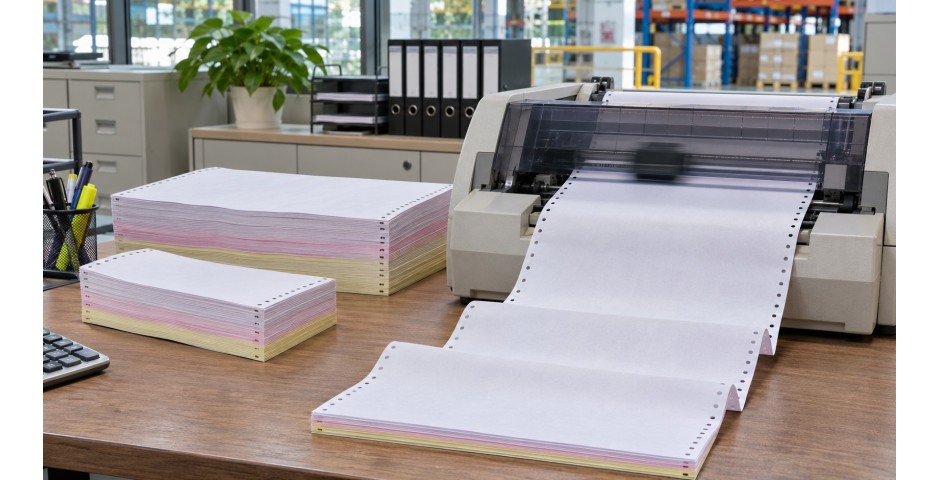
If you have ever received a payslip with little holes running down both sides, you have seen a continuous computer form. These long, folded stacks of paper look old fashioned. Yet walk into the accounts department of many factories, hardware shops, logistics firms and government offices in Malaysia, and you will still find a dot matrix printer busy at work.
So who still uses continuous forms, and why? And how do you choose between the two common sizes, 9.5" x 11" and 15" x 11"? This guide answers those questions in plain terms.
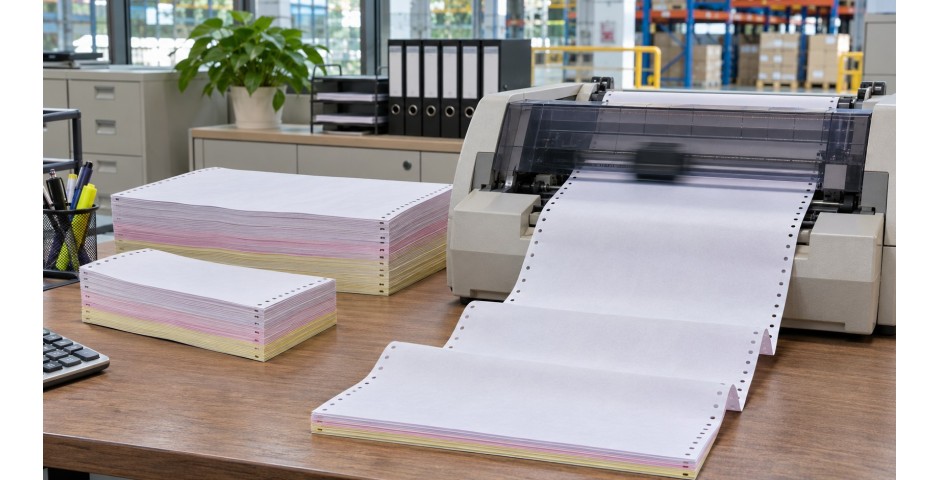
A continuous form is one long strip of paper, folded back and forth like a fan into a neat stack. Each page is joined to the next by a perforated line, so you can tear them apart after printing.
If you have ever received a payslip with little holes running down both sides, you have seen a continuous computer form. These long, folded stacks of paper look old fashioned. Yet walk into the accounts department of many factories, hardware shops, logistics firms and government offices in Malaysia, and you will still find a dot matrix printer busy at work.
So who still uses continuous forms, and why? And how do you choose between the two common sizes, 9.5" x 11" and 15" x 11"? This guide answers those questions in plain terms.
What Is a Continuous Computer Form?
A continuous form is one long strip of paper, folded back and forth like a fan into a neat stack. Each page is joined to the next by a perforated line, so you can tear them apart after printing.
Down both sides of the paper are rows of small round holes. These are called tractor holes or pin feed holes. They fit onto the sprockets of a dot matrix printer, which pulls the paper through one page after another without stopping. The side strips are also perforated, so you can tear them off for a clean finish.
Because the paper is fed by pins rather than rollers, it moves through the printer in a very straight, steady line. That is one reason continuous forms are so reliable for long print runs.
Why Dot Matrix Printers Are Still Around
Laser and inkjet printers have taken over most office work. But dot matrix printers, also called impact printers, still do some jobs better. Here is why many businesses keep them.
- They print copies in one go. A dot matrix printer strikes the paper with tiny pins. When you use multi-ply carbonless forms, that pressure creates two or three copies at the same time. A laser printer can't do that.
- They run for long hours. These printers are built for heavy, continuous jobs like monthly payroll or daily delivery orders.
- They work with older accounting systems. Many businesses have software set up years ago to print onto pre-printed continuous forms. Changing everything is costly, so they keep what works.
- Running costs are low. A ribbon lasts a long time and costs far less than toner.
The Two Common Sizes
9.5" x 11" forms
This is the most common continuous form size. Once you tear off the tractor strips on each side, the page becomes about 8.5" x 11", which is close to a standard letter page. It fits neatly into normal files and envelopes.
Typical uses include:
- Invoices and delivery orders
- Payslips and pay vouchers
- Receipts and official letters from accounting systems
- Short reports and statements
15" x 11" forms
The wider 15" x 11" form gives you much more room across the page. It is roughly similar to an A3 sheet turned sideways. Accountants and managers use it when they need many columns side by side.
Typical uses include:
- General ledgers and trial balances
- Stock and inventory listings
- Monthly sales and payroll summaries
- Any wide report with lots of columns
One important point: a 15" form needs a wide-carriage dot matrix printer. A narrow printer only takes the 9.5" size. Check your printer model before ordering.
1-Ply, 2-Ply or 3-Ply?
The "ply" tells you how many layers the form has. Each extra layer gives you one extra copy.
| Ply | What you get | Good for |
|---|---|---|
| 1-ply | One original | Reports, listings, internal records |
| 2-ply | Original plus one copy | Invoices, receipts, payslips (one for staff, one for HR) |
| 3-ply | Original plus two copies | Delivery orders (customer, driver, office) |
Multi-ply forms use carbonless paper. The layers are often in different colours, such as white, pink and yellow, so you can tell at a glance which copy goes where. For example, white for the customer, pink for accounts and yellow for the store.
Payslips: A Special Case
Payslip forms are a good example of why continuous forms are still useful. Some payslip forms are designed so that the salary details print on the inside, hidden from view. The employee tears open the sealed form to read it. This keeps pay information private until it reaches the right person.
If your HR team prints payslips every month, a ready-made payslip form saves time. There is no folding, no envelopes and no risk of someone seeing a colleague's salary by mistake.
Tips for Smooth Printing
- Line up the first page. Set the top of form correctly so every page prints in the right place. A small error here repeats on every page.
- Give the paper space. Place the stack straight behind or below the printer so it feeds without twisting. Leave room for the printed pages to fold back down.
- Adjust the head gap for multi-ply. Most dot matrix printers have a lever for paper thickness. Set it higher for 3-ply forms so all the copies come out clear.
- Change the ribbon on time. A worn ribbon gives faint text, and the last copy in a 3-ply set will be the first to suffer.
- Store paper flat and dry. Malaysia's humidity can make paper curl, and curled forms jam. Keep boxes off the floor and closed until use.
Is It Time to Switch?
Some businesses are moving to laser printers and digital records. That makes sense for many tasks. But if you need instant multiple copies, signed delivery orders or printed payslips, continuous forms are still a simple and proven choice. Many companies use both. They print reports on a laser printer and keep the dot matrix for invoices and delivery orders.
Stock Up on Computer Forms at paper.com.my
At paper.com.my, we carry continuous computer forms in both 9.5" x 11" and 15" x 11" sizes, plus ready-to-use payslip forms. We can help you choose the right ply for invoices, delivery orders and reports.
Tell us your printer model, the size you need and how many copies each form should make. Send a quote request and our team will recommend the best match, so your month-end printing runs without a hitch.
In Same Category
- Copier Paper GSM Guide: 70gsm vs 80gsm and Why It Matters for Jams and Print Quality
- Thermal vs Carbonless (NCR) vs Fax Paper Rolls: A Buyer's Guide for Malaysian Businesses
- Paper Sizes Explained: A4, A3, A5, B4, B5 and F4. Which One Does Your Office Actually Need?
- Pizza Kotak Guide: Choosing the Right Pizza Box Size, Material and Print for Your F&B Business
- The Complete Packaging Supplies Checklist for Malaysian Online Sellers